4 Sept 2013

Tweaking filter() of python

Following is basic list comprehension example which filter out the even numbers from a list.
>> [ x for x in [1,2,3,4] if  if n%2==0]
[2, 4]

Same can be achieved from filter(func, sequence). And for that we have to write the filter logic in a function, say poi().

>> def pp(n):
...     if n%2==0:
...             return True
...     else:
...             return False
...

>> filter(pp, [1,2,3,4])
[2, 4]

Upto here it seems that the filter(func, seq) takes a function as a first argument and sequence type (list, tuple , string, unicode or xrange() ) as a second argument. And for each element of sequence type it runs the function and returns elements of type seq.
The elements of returned list are initialized from the function, for which function returns True.

To see how filter() behaves ,return type of poi() has been played with.
Tweak 1: what if return type is False or None ?
def poi(x):
    return X    //X =False or None
>> filter(poi, [1,2,3,4])
[]

Tweak 2: what if i return type is string ?
Lets say for 2 in list , i want to return "two". 
def poi(x):
    if x==2:
        return "two"
>> filter(poi, [1,2,3,4])
[1, 2, 3]

Tweak 3: what if i return type is int ?
Lets say for 2 in list , i want to return 4.
def poi(x):
    if x==2:
        return x*x
>> filter(poi, [1,2,3,4])
[1, 2, 3]


What i learned :

1. filter(func, seq) will create a list of elements for which the function , poi() , returns True.
2. if poi() returns False or None for an element then resultant list will be an empty list.
3. if poi() returns other than boolean,  then it will return given list of filter.

What i understood:

say i have a sequence S having n elements and i want to filter the elements on some boolean condition, then filter() can rescue me.  Note that resultant sequence type will have all or some elements of given sequence for which boolean condition is True.


31 Aug 2013

Catching an Exception in Python


Catching a exception without name: 
try:
      x = 1/0
except:
     print "it will be catched"

To get information about a exception,  use sys.exc_info() in except clause.:
excep_info = sys.exc_info()   // it returns a tuple
excep_info[0]   == type of exception
excep_info[1]  == exception message or arguments
excep_info[2]  == exception object value.


Catching a exception by name:
 try:
      x = 1/0
except ValueError:
     print "it will be catched"

or  (to get exception information)

 try:
      x = 1/0
except ValueError as exp:
     print "it will be catched"
     print type(exp)    // type of exception
     print exp.args     //exception message or argumenst


Catching exceptions by names , incorrectly :
 try:
      x = 1/0
except ZeroDivisionError, TypeError:
     print "it will be catched"

There are two issues with above code:
1) It will not catch the  ZeroDivisionError exception in a wrong way.
    Reason: except statement is interpreted  in a wrong way.
    except ZeroDivisionError as  TypeError:
    It is because in old python except ZeroDivisionError, e, anything after comma is interpreted as        alias to the exception before comma.

 TypeError is used as a reference to the ZeroDivisionError as following code shows.
      print "it will be catched", TypeError
output
     it will be catched integer division or modulo by zero

2) It will not catch the TypeError.
    Reason: since TypeError will be used as a reference.


Catching exceptions by names , correctly :
In this case either of the exception will be catched.
  try:
      x = 1/0
except ( ZeroDivisionError, TypeError ):
     print "it will be catched"


28 Aug 2013

Boolean Value of a Data Types in Python

Boolean values in python are True, False and None. While going through the pages of DiveIntoPython , i found a sentence which says that :

You can use virtually any expression in a boolean context.

then i thought ANY expression ?  so i tried following code :

if "poi":
     print "yes"    
else:
    print "no"

My first guess was that it should give error, since "poi" is not evaluates to be a boolean value. It didn't give any error and prints the "yes". but .....Why ?

Every datatype in python has a boolean associated value with it. So string, list , tuple and dictionary are all can be used in the boolean context.

Then what evaluates true or False for these data types ?

Well, whenever these data types are empty, their boolean value will be False.
>>var=""
>>bool(var)
False
Same is true for [], (), {} i.e. non-empty list, tuple and dictionary.

And when these data types are not empty having atleast one element , their boolean value will be True.
>>var="python"
>>bool(var)
True
Same is true for [3], (4,5), {"key": 3} i.e. non-empty list, tuple and dictionary.

For numbers ,
None evaluates to be False.
non-zero number evaluates to be True.
0 (or 0.0) evaluates to be False.


Zen of Python

The guideline principles behind the python language design by Tim Peters.

>> import this
The Zen of Python, by Tim Peters

Beautiful is better than ugly.
Explicit is better than implicit.
Simple is better than complex.
Complex is better than complicated.
Flat is better than nested.
Sparse is better than dense.
Readability counts.
Special cases aren't special enough to break the rules.
Although practicality beats purity.
Errors should never pass silently.
Unless explicitly silenced.
In the face of ambiguity, refuse the temptation to guess.
There should be one-- and preferably only one --obvious way to do it.
Although that way may not be obvious at first unless you're Dutch.
Now is better than never.
Although never is often better than *right* now.
If the implementation is hard to explain, it's a bad idea.
If the implementation is easy to explain, it may be a good idea.
Namespaces are one honking great idea -- let's do more of those!


while coding the python above points should be considered. Then on can say that it is a pythonic code.

Python Collection: Counter Class

Conceptual idea of Counter is class is to represents the multiset of mathematics. Mutiset is set which allows the a member(element) to appear more than once like [a,a,a,b,b,b,b,c,c].
Number of times a element appear is said to be multiplicity of element.
Where this multiset can be useful ?
Prime factor of 144 is [2,2,2,2,3,3],  which is a multiset !!

In python terms
Counter is a subclass of dict which stores the element as a key and count as a value. It is unordered collection type.
This class supports the mathematical operations like addition, subtraction, union and intersection between two objects. To use this class one needs to import Counter class from collections package.
In this post i'm going to work around this class for basic operations.

Use case 1:
Let say we have a list  ['red', 'blue', 'red', 'green', 'blue', 'blue']. from which we want to find out the number of occurrence of a element.
>>> color_list = ['red', 'blue', 'red', 'green', 'blue', 'blue']
>>> cnt = Counter()
>>> for word in color_list:
...     cnt[word] += 1
>>> cnt
Counter({'blue': 3, 'red': 2, 'green': 1})


creating the counter object :
>>> from collections import Counter             //importing Counter
>>> c = collections.Counter(a=3, b=2, c=5)

printing counter object :
>>> c
Counter({'c': 5, 'a': 3, 'b': 2})
>>> c.items()
[('a', 3), ('c', 5), ('b', 2)]

list all elements in a counter object :
>>> list(c.elements())
['a', 'a', 'a', 'c', 'c', 'c', 'c', 'c', 'b', 'b']

finding the count for an element :
>> c['a']
3
one interesting thing here is if we tries to find the element which is not in c , say c['k']
>> c['k']
0         // returns zero not KeyError,  which is a case when using the dictionary.

get the all keys and values in counter object :
>>> c.keys()
['a', 'c', 'b']
>>> c.values()
[3, 5, 2]

finding the most common elements and their count using most_common(n) method, where n is number of elements :
>>> c.most_common(1)   // n is 1
[('c', 5)]
and 
>>> c.most_common(2)  // n is 2
[('c', 5), ('a', 3)]

updating the counter object : 
>> c2 = {'a': 5}
>> c.update(c2)
>> c
Counter({'a': 8, 'b': 5, 'b': 2})    // value of a element is updated to (3+5=8).

Use case 2 : Find out the most common words in a file 
>>> import re
>>> words = re.findall(r'\w+', open('hamlet.txt').read().lower())
>>> Counter(words).most_common(10)
[('the', 1143), ('and', 966), ('to', 762), ('of', 669), ('i', 631),
 ('you', 554),  ('a', 546), ('my', 514), ('hamlet', 471), ('in', 451)]

Django Import Cheat-sheet

In large full fledged Django web project consist the several applications and each applications having the view which are using various django's methods or classes. I  have noticed that some imports for methods or classes are used in almost every view. 

To keep them in sight i'm listing it out here : 

from django.http import HttpResponse, HttpResponseRedirect, Http404
from django.shortcuts import render_to_response
from django.template import RequestContext
from django.contrib.auth.decorators import login_required, permission_required
from django.contrib.admin.views.decorators import staff_member_required
from django.contrib.auth.decorators import login_required
from django.core.exceptions import ObjectDoesNotExist, ViewDoesNotExist

from django.utils import simplejson
from django.template.defaultfilters import slugify
from django.template.loader import render_to_string
from django.core.urlresolvers import reverse
from django.db.models import Q


from django.core.exceptions import PermissionDenied
from django.utils.translation import ugettext as _
from django.forms.models import modelformset_factory

26 Aug 2013

Stacktrace of Django's Request and Response

In this post I'll going to explore what happens behind the scenes when we make a request for a resource (normally a template) and how Django sends the response.
All of the action happens in the django/core/handlers/base.py file.

1. On request server make server instance which is django.core.handlers.BaseHandler object. The server can be mod_python or wsgi type.


2. Import project's setting.py file and Django custom exception classes.


3. loads middleware classes by calling the load_middleware() of BaseHandler. 

    (ImproperlyConfigured exception is thrown from  here)

4. server instance dispatches the request_signal and create the instance of HttpRequest. this request object may be of mod_python [ django.core.handlers.wsgi.ModPythonRequest ]  or wsgi [ django.core.handlers.wsgi.WSGIRequest] depending upon the server type.


5. get_reponse(request) of BaseHandler is called. Its main purpose is to return HttpResponse object. This is most important method to for a request to get successful response or otherwise. 

I have divided the working of get_reposne(request) in following two phases:

phase 1: request

a). Execute the process_request(reqest) of middleware by passing the request object.
b). If process_request() returns the None then resolves the url by calling resolve() on    
     django.core.urlresolvers
c). If url resolution is successful then  calls process_view( request, view_fuc, url_arg )
     If url is not successful then returns the django.http.Http404.

process_view( request, view_fuc, url_arg ) either returns None or HttpResponse object.

 If it returns None then Django will continue processing the request and will call appropriate view. 
If it returns the HttpResponse object then django will not call view. 


phase 2: response

When view() is called and it should either response or exception.
If response is  response_object :
a).process_template_response(request, reponse ) is called by view() if response instance has render() associated with it, response parameter is of type TemplateResponse.
It is where you get the required response (html). 
 b).process_template_response(request, reponse ) is called by view() if response instance has render() associated with it, response parameter is of type HttpResponse or StramingHttpResponse.
If response is  None: 
c). process_excpetion(request, exception) is called which throws ValueError like:
raise ValueError("The view %s.%s didn't return an HttpResponse object." % (callback.__module__, view_name))

So for every request(url) either you will get response (e.g. html) or exception. 

23 Aug 2013

No JSON object could be decoded: line 1 column 0 (char 0)

I have written a python code which makes the HTTP requests to fetch the json data.
The json data seems like :
{    
  "items": [
          {
            "question_id": 18384375,
            "answer_id": 18388044,
            "creation_date": 1377195687,
            "last_activity_date": 1377195687,
            "score": 0,
            "is_accepted": false,
            "owner": {
                "user_id": 1745001,
                "display_name": "Ed Morton",
                "reputation": 10453,
                "user_type": "registered",
                "link": "http://stackoverflow.com/users/1745001/ed-morton"
                 }
          },
      ]
}

Code : 

>>url="https://api.stackexchange.com/2.1/answers?order=desc&sort=activity&site=stackoverflow"
>>obj = urllib.urlopen(url)
>>response_str = obj.read()
>>response_json = simplejson.loads(response_str)

Error : 

The last line above shoots following  error.
JSONDecodeError at /
No JSON object could be decoded: line 1 column 0 (char 0)

when i tried to change the simplejson to json object for loads() then following  error occurred
ValueError at /
No JSON object could be decoded

I tried to check the json format using the Jsonlint which gave me error :


The error suggested that problem is of encoding type of the response . Then i inspects the response information like
    >>obj.info()
         Server: nginx
         Date: Fri, 23 Aug 2013 04:51:01 GMT
         Content-Type: application/json; charset=utf-8
         Connection: close
         Cache-Control: private
         Content-Encoding: gzip
         Access-Control-Allow-Origin: *
         Access-Control-Allow-Methods: GET, POST
         Access-Control-Allow-Credentials: false
         Content-Length: 2334

Solution:

The problems seems to be of content Content-Encoding of the response which is gzip format and simplejson or json  is failed to correctly parse that. After many searches on stackoverflow i found the following the solution(s) of problem.
Solution: better to use requests object.

1) using only requests
   import requests
   response_json = requests.get(url).json()


2)  using only requests with simplejson or json.
     import requests
     response = requests.get(url)
     response_json = simplejson.loads(response.text)
     print response_json

Above both the codes  returning the correct Content-Encoding for json.
>>reposnse_json.encoding
     utf-8
>>response_json.headers['content-type']
    "application/json; charset=utf8'


10 Aug 2013

Selecting checkboxes in jquery

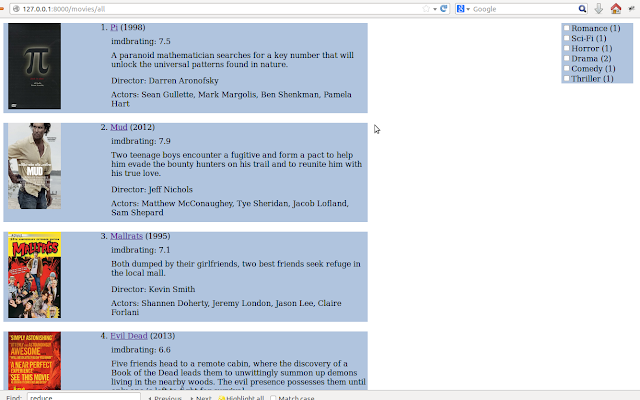
In my recent side project (clone of imdb.com), number of checkbox options were provided from which user can select the genre(s) of the movie and on the basis of that movies are filtered and shown.
Basically this is divided into two parts, first in which i'll get the all checked genre(s) and second part is to show movie(s) based on that genre(s).


In this post i'm wrting about how i accomplished first part which is divided into number of tasks.

In my template , following is code for showing genre(s) each having  checkbox option.

<div class="refine_box">
        {% for k, v in genre_dic.items  %}
            <input type="checkbox" class="check_id" name="genre" value="{{ k }}">{{ k }} ({{ v }})<br>
        {% endfor %}
</div>

genre_dic is a dictionary having key as a genre and value is number of movies for that genre.

task1: get the value of checkbox which is checked. 
 $(".refine_box input[type=checkbox]").click(function() { 
        
            var isChecked = $(this).is(':checked');
            if(isChecked){
                    alert(#(this).val())
            }
});


task2: get the values of all checkboxes which are checked.
 $(".refine_box input[type=checkbox]").click(function() { 
        
        var arr_refine = [];    //this will store all clicked checkboxes

        $(".check_id:checked").each(function() {
                arr_refine.push(this.value);

        });
 
  }); 

task3: passing array from ajax request to Django view.
In previous task i have created a array holding all genre, so in this task that array we will send to view.
      $.ajax({
                    url: "{% url ajax_refine_movieslist %}",
                    data: {arr_refine: arr_refine},
                   
            });    


Follwoing is whole code of jquery :
 $(".refine_box input[type=checkbox]").click(function() { 
        
        var arr_refine = [];

        $(".check_id:checked").each(function() {
                arr_refine.push(this.value);
               
        });

        $.ajax({
                    url: "{% url ajax_refine_movieslist %}",
                    data: {arr_refine: arr_refine},
                    dataType:'html',
                    success: function(newData){
                         $('.movie_listing').html(newData);
                    }
                   
            });       
   
    }); 
   
task4 : printing the list holding the selected genre(s)
def ajax_refine_movies(request):
    genre_list = request.GET.getlist('arr_refine[]')
    print genre_list


This is how i'm getting the all checkbox selected options.
Soon i'll post second part of this.


31 Jul 2013

Code that i love and that i hate

A programming language is a  set of specification and rules. It is better to stick to those while you are coding.
Anyone having basic arithmetic ability and knowledge of for loop can code a Fibonacci series.  Since one can understand the problem and apply his/her logic to solve. But writing a good code and writing a code is two different things.
Writing a code is just like typing the problem logic and make it work. Whereas the writing a good code is to present it beautifully so it looks like a piece of art.
A "good code" has to be well structured, clean and understandable.


Good code

Using appropriate names for variables , functions, classes etc.
Comment as much as you can , for which is not obvious .
Divide whole problem into modules.
Proper indentation.
Logical organization of statements.
Appropriate error handling mechanism.
Prefer clarity to "efficiency" read as premature efficiency.
Declare where you use or declare all data at same place.
Choosing appropriate data structure for the problem.
Code as per the the programming language's style conventions or standards.


Code that i hate to work with.

Basically it will be a right opposite of "good code". To name a few
naming variables to anything rather than some meaningful name.
Consistently bad indentation.
No comments to important parts of code.
Code striving for premature efficiency.
Repeating same code which is better to be modularized.
Doing more that one thing in a module.


But in real work environment one has to work with other fellows who habitually wrote opposite of "good code". They tends to follow writing style rather than coding style.
And when you are sharing your code to such a guy and he is making changes to it .. which will diminish the beauty of your code, then you have to write this post and ask them to go through it.


30 Jul 2013

Serving uploaded images in Django

I ran into trouble while serving the uploaded images from database in template. In this post i'll  share what mistakes i made and how i rectified those mistakes.

Problem was :
In template the uploaded image was not showing like
{% for movi in all_movies %}
<div class="movie_frame">
<img src="{{MEDIA_URL}}{{ movi.poster}}" alt="xxx" height="140" width="110" />
</div>
{% endfor %}


For uploaded files one needs to set the MEDIA_ROOT and MEDIA_URL setting in settings.py.
setting.py
SITE_ROOT = os.path.dirname(os.path.realpath(__file__))
MEDIA_ROOT = os.path.join(SITE_ROOT, 'media')
MEDIA_URL = '/media/'

Note:
MEDIA_ROOT is a absolute physical location where the images are to be stored. This will create a 'media' folder under SITE_ROOT.
MEDIA_URL  is url reference which is to be used inside template to get the image.


Mistake 1: The value of MEDIA_URL is same as the MEDIA_ROOT value i.e. "media".


Correction : changed the MEDIA_URL value from "media" to "/site_media/". you can give any valid string but make sure it should not be same as of MEDIA_ROOT value.


models.py
from django.db import models
from imdbclone.settings import MEDIA_ROOT
class Movies(models.Model):
    title = models.CharField(max_length=50, blank=False)
    plot =  models.CharField(max_length=500, blank=True)
    actors = models.CharField(max_length=200, blank=True)
    poster = models.ImageField(upload_to=MEDIA_ROOT, blank=True)

here poster will save the image to MEDIA_ROOT which is already been there, that initially i thought.

Mistake 2: upload_to attribute of ImageField is MEDIA_ROOT , is wrong.

Correction : poster filed in database will have the absolute path to the image like /home/navyad/workspace/imdb/imdbclone/imdbclone/media/media/image.jpg, which is wrong.
I changed the upload_to attribute value from MEDIA_ROOT to "poi" (any valid string will work).
Note :
      a)  Corresponding to upload_to value a folder will be created, in this case "poi". This folder will be             created under MEDIA_ROOT. And this is where the image actually stored.
      b)  poster filed in database it will contain image reference like poi/image.jpg,


movies/urls.py :
from imdbclone import settings
from django.views.static import serve
urlpatterns = patterns('',
                           url(r'^site_media/(.*)$', serve, {'document_root': settings.MEDIA_ROOT}),  
)
In template when image is to be displayed using <img src ..> tag , it will make the request to get image. For that we have specified the url.

Mistake 3: placing url for image in wrong file.

Correction : I was using this for movies app and i placed the url for image in movies.urls , which supposed to be in the project main urls.py file alongside where setting.py live.

After correcting all the mistakes , and when image is loaded in template, i found this observation.
The <img src="" /> value  will be like
<img width="110" height="140" alt="xxx" src="/site_media/poi/image.jpg">
note 
src value : MEDIA_URL/upload_to/imagename


With these mistake i have learned how to serve the uploaded content using MEDIA_ROOT and MEDIA_URL.
At end i will share this quote :
If you're not making mistakes, then you're not doing anything. I'm positive that a doer makes mistakes.
John Wooden 

25 Jul 2013

Error: That port is already in use

I was having a trouble to restart a Django server. At first time , i started a server like
>>python manage.py runserver 192.168.1.5:8000
no problem it started running fine.

I had to change the models so i exit the server using ctrl-Z and issue command to create the tables
>>python manage.py syncdb

Now when i tries to again start the server by issuing
>>python manage.py runserver 192.168.1.5:8000 again ,
it returns error message Error: That port is already in use.

This error means that port is already in use and to use same port , first we needs to kill process running on that port. Which involves following two steps :

1. Finding process for port 8000
  >>sudo netstat -lpn |grep :8000
this will return something like:
tcp        0      0 192.168.1.5:8000    0.0.0.0:*        LISTEN      10797/python   

here 10797 is a process id running on port 8000.

2. Kill the process
   >>kill -9 10797

Now
>>python manage.py runserver 192.168.1.5:8000 
would start the server again successfully.


4 Jul 2013

Django path in your system

Django path in your system depends upon on how you have installed Django in your system.

If you have installed Django through pip installer then it should be like
'/usr/local/lib/python2.7/dist-packages/django/ 

If you have installed Django manually i.e. by downloading Django-X.Y.tar.gz file then
Django will be installed in you python installation directory under /site-packages/ directory


Finding Django path
There different ways you can find that out. 
the django path may vary depending upon the OS you are using,following examples are for ubuntu12.04.

>>> import django  
>>> print django.__file__  
'/usr/local/lib/python2.7/dist-packages/django/__init__.py'

or

>> import inspect  
>> import django  
>> print inspect.getabsfile(django)
'/usr/local/lib/python2.7/dist-packages/django/__init__.py'

or

>> import django
>>django

 or

>> import django
>>django.__path__